Scorpio News |
October–December 1987 – Volume 1. Issue 4. |
| Page 51 of 55 |
|---|
My current CONFIG.SYS is:
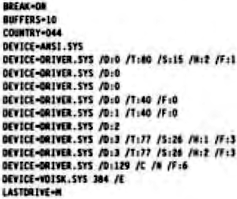
Hope this didn’t bore the pants off you, Regards
John Parrott
P.S. It is now clear that once disks are formatted, the system is quite happy using just logical drives A: and B:. It is probably unnecessary to have all those entries in the CONFIG.SYS file and I shall experiment with using a batch file to do formatting and this will contain temporary parameters and finish with a call to AUTOEXEC.BAT to restore normal system values.
P.P.S I’m not sure I can get at these values from a BAT file but I’m working on it.
80-BUS to/from Amstrad PC1512
by A.A. Bryan
This describes one method of transferring text and data files between a Nascom/
Assuming that the following Nascom/
Nascom 2 with GM802 64k RAM and GM809 or GM829 disk system with 2 x 5.25″ Floppy Disk Drives (or equivalent Gemini or other system), CP/M Operating System with SYS Custom BIOS configured for IBM SSDD on Drive B:
- Format a disk on PC1512 using DOS-PLUS operating system and DISK Prog. Format Option: 160K CP/M Disk
-
Insert CP/M 160 formatted diks (from 1) into Nascom/
Gemini, Drive B: -
Transfer files from Nascom/
Gemini, Drive A: to Drive B: using PIP, GEMPEN, etc. -
Move CP/M 160 disk from Nascom/
Gemini machine to PC1512, Drive B:. - Transfer the data to a DOS 360 formatted disk using PIP or COPY on DOS-PLUS or COPY on MS-DOS operating systems of the PC1512.
-
A reverse procedure to transfer text files from Amstrad PC1512 10 Nascom/
Gemini works all right if care is taken not to overload the available RAM and disk-file space on the Nascom/ Gemini machine. Large text files over 48K in size should be split into smaller, more manageable parts before attempting a transfer.
Ed. – a far easier, but costlier, method is to use Gemini BIOS 3.2 or later, along with the optional
(and in my opinion over-priced) IBM-COPY program. Or make use of Scorpio System’ disk
transfer/
| Page 51 of 55 |
|---|